Odoo14用戶使用手冊
最後更新:
2024年01月18日
已完成
Odoo Barcode使用說明 odoo14條碼如何使用
1727 瀏覽數 •odoo库存管理操作实施详解(一)
2993 瀏覽數 •odoo库存管理操作实施——产品如何创建详解
2956 瀏覽數 •odoo库存管理操作实施——产品变体解读详解
3047 瀏覽數 •odoo库存管理操作实施——产品计量单位设置
2209 瀏覽數 •odoo库存管理操作实施——产品包装如何配置
2572 瀏覽數 •使用简体中文及操作odoo
2520 瀏覽數 •添加用户和管理访问权限
2090 瀏覽數 •从odoo导出数据
2267 瀏覽數 •如何生成一个Unsplash访问密钥
2151 瀏覽數 •如何生成Unsplash应用程序ID
2388 瀏覽數 •如何适配导入模板
1908 瀏覽數 •多公司
2065 瀏覽數 •如何允许用户使用Google帐号登录
2167 瀏覽數 •如何允许用户通过LDAP帐号登录
1806 瀏覽數 •付款收单行(信用卡、在线支付)
2148 瀏覽數 •配置你的Paypal帐号
2339 瀏覽數 •启用开发人员调试模式
2051 瀏覽數 •如何开始使用讨论应用
2410 瀏覽數 •odoo库存管理操作实施——产品变体解读详解
3047 瀏覽數 •odoo库存管理操作实施详解(一)
2993 瀏覽數 •odoo库存管理操作实施——产品如何创建详解
2956 瀏覽數 •odoo库存管理操作实施——产品包装如何配置
2572 瀏覽數 •使用简体中文及操作odoo
2520 瀏覽數 •如何开始使用讨论应用
2410 瀏覽數 •如何生成Unsplash应用程序ID
2388 瀏覽數 •配置你的Paypal帐号
2339 瀏覽數 •从odoo导出数据
2267 瀏覽數 •odoo库存管理操作实施——产品计量单位设置
2209 瀏覽數 •如何允许用户使用Google帐号登录
2167 瀏覽數 •如何生成一个Unsplash访问密钥
2151 瀏覽數 •付款收单行(信用卡、在线支付)
2148 瀏覽數 •添加用户和管理访问权限
2090 瀏覽數 •多公司
2065 瀏覽數 •启用开发人员调试模式
2051 瀏覽數 •如何适配导入模板
1908 瀏覽數 •如何允许用户通过LDAP帐号登录
1806 瀏覽數 •Odoo Barcode使用說明 odoo14條碼如何使用
1727 瀏覽數 •如何允许用户通过LDAP帐号登录
- Install the LDAP module in general settings
- Click **Create** and set up your LDAP server.
- Select the company that will use LDAP
- In **server information**, enter your server's IP address and the port it listens on
- If your server is compatible, check **Use TLS**
- In **login information**, enter the account ID and password used to query the server. If left blank, the server will query anonymously.
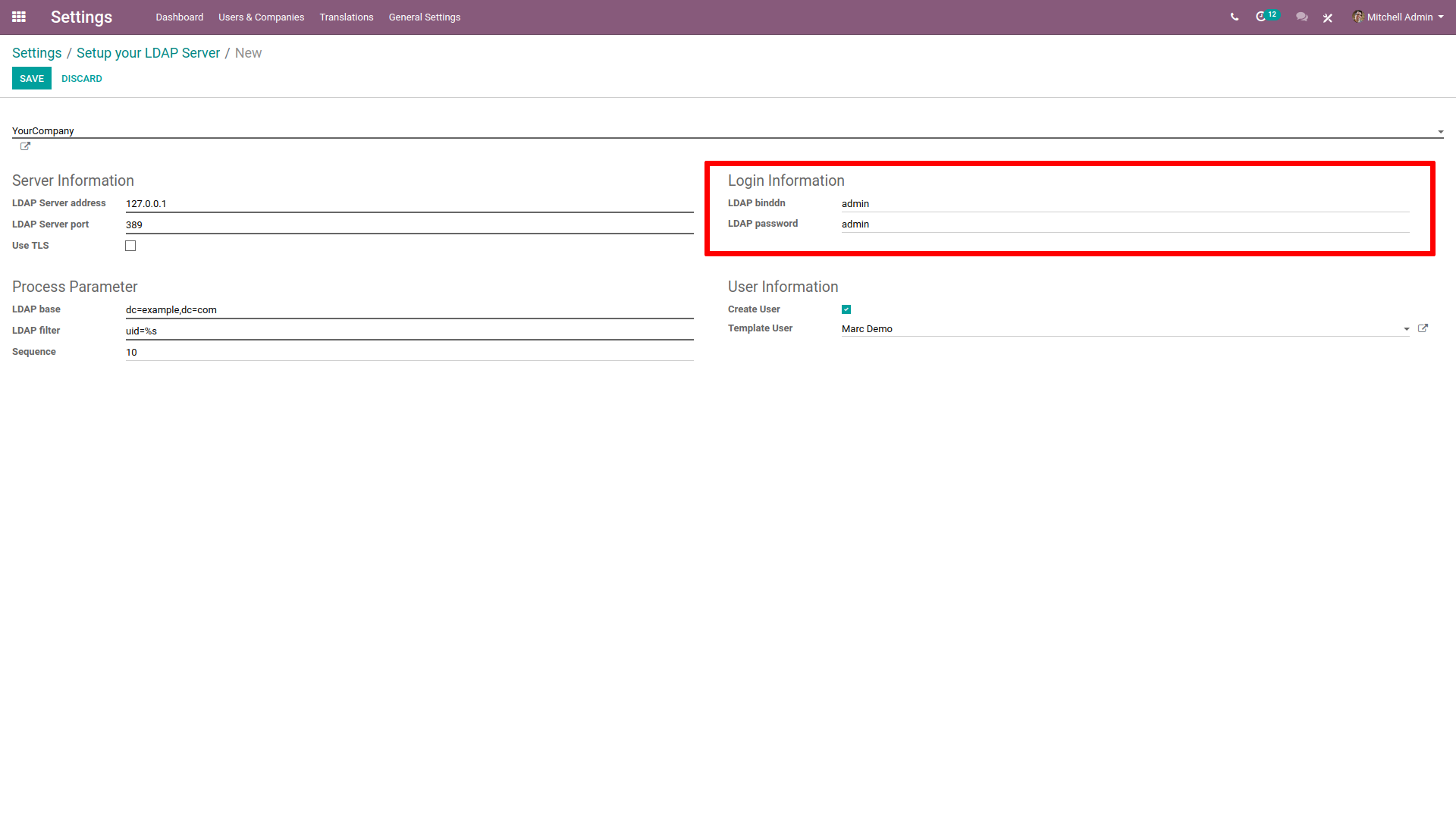
- In **processing parameters**, enter your LDAP server domain name in the LDAP naming rule (for example,
dc=example,dc=com). - In LDAP filter, enter
uid=%s
- In **User Information**, if you want Odoo to create a user profile when logging in with LDAP for the first time, check *Create User*.
- In Template User, indicate a template for the new profiles created. If left blanked, the admin profile will be used as template.
