Odoo14 User Manual
Last update:
01/18/2024
Completed
Odoo Barcode使用说明 odoo14条码如何使用
1468 Views •odoo库存管理操作实施详解(一)
2560 Views •odoo库存管理操作实施——产品如何创建详解
2575 Views •odoo库存管理操作实施——产品变体解读详解
2524 Views •odoo库存管理操作实施——产品计量单位设置
1916 Views •odoo库存管理操作实施——产品包装如何配置
2299 Views •使用简体中文及操作odoo
2125 Views •添加用户和管理访问权限
1853 Views •从odoo导出数据
1956 Views •如何生成一个Unsplash访问密钥
1912 Views •如何生成Unsplash应用程序ID
1976 Views •如何适配导入模板
1687 Views •多公司
1782 Views •如何允许用户使用Google帐号登录
1907 Views •如何允许用户通过LDAP帐号登录
1594 Views •付款收单行(信用卡、在线支付)
1756 Views •配置你的Paypal帐号
1969 Views •启用开发人员调试模式
1814 Views •如何开始使用讨论应用
2104 Views •odoo库存管理操作实施——产品如何创建详解
2575 Views •odoo库存管理操作实施详解(一)
2560 Views •odoo库存管理操作实施——产品变体解读详解
2524 Views •odoo库存管理操作实施——产品包装如何配置
2299 Views •使用简体中文及操作odoo
2125 Views •如何开始使用讨论应用
2104 Views •如何生成Unsplash应用程序ID
1976 Views •配置你的Paypal帐号
1969 Views •从odoo导出数据
1956 Views •odoo库存管理操作实施——产品计量单位设置
1916 Views •如何生成一个Unsplash访问密钥
1912 Views •如何允许用户使用Google帐号登录
1907 Views •添加用户和管理访问权限
1853 Views •启用开发人员调试模式
1814 Views •多公司
1782 Views •付款收单行(信用卡、在线支付)
1756 Views •如何适配导入模板
1687 Views •如何允许用户通过LDAP帐号登录
1594 Views •Odoo Barcode使用说明 odoo14条码如何使用
1468 Views •如何允许用户通过LDAP帐号登录
- Install the LDAP module in general settings
- Click **Create** and set up your LDAP server.
- Select the company that will use LDAP
- In **server information**, enter your server's IP address and the port it listens on
- If your server is compatible, check **Use TLS**
- In **login information**, enter the account ID and password used to query the server. If left blank, the server will query anonymously.
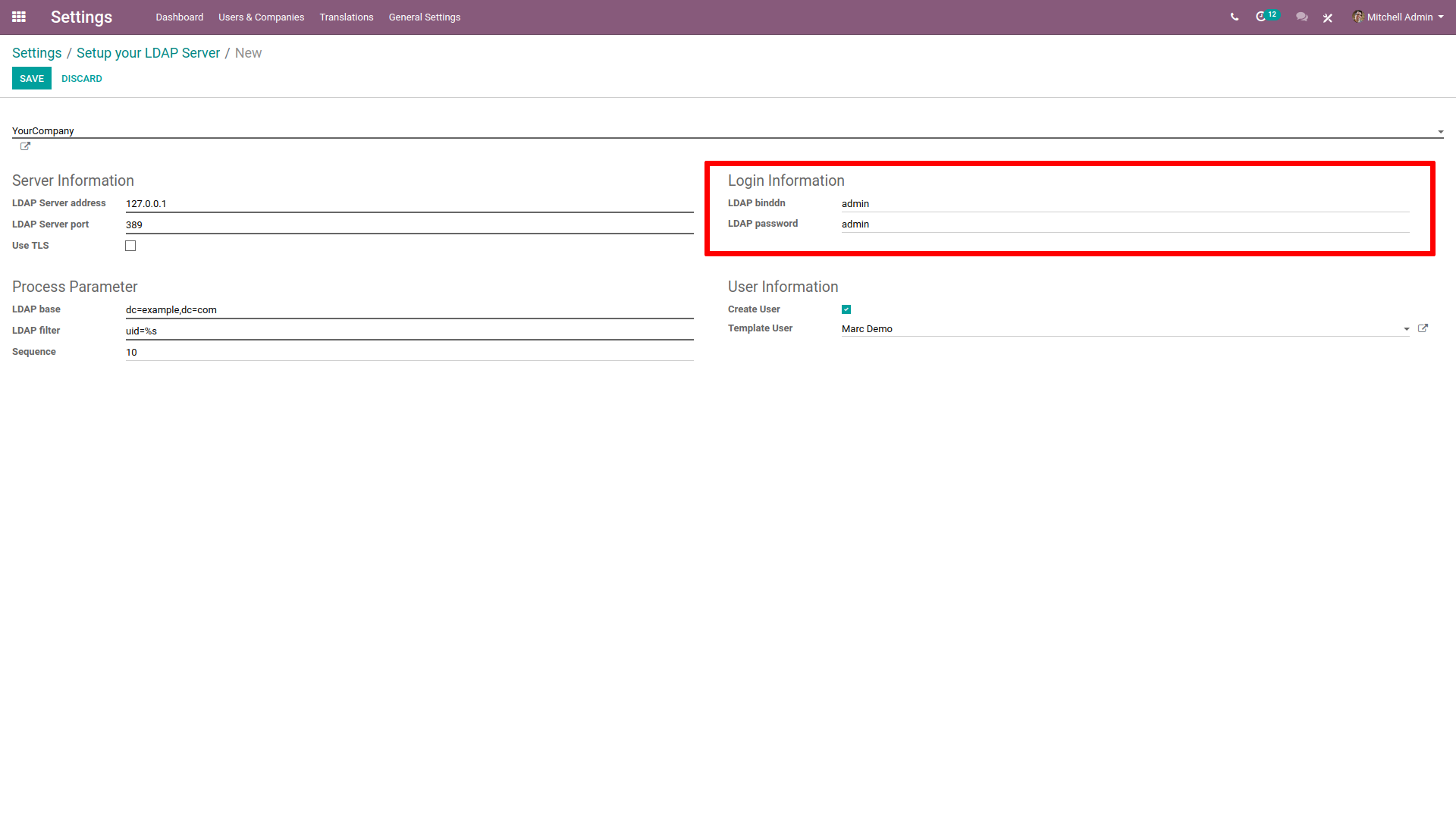
- In **processing parameters**, enter your LDAP server domain name in the LDAP naming rule (for example,
dc=example,dc=com). - In LDAP filter, enter
uid=%s
- In **User Information**, if you want Odoo to create a user profile when logging in with LDAP for the first time, check *Create User*.
- In Template User, indicate a template for the new profiles created. If left blanked, the admin profile will be used as template.

Rating
0
0
Commenting is not enabled on this course.